See the degrees of freedom
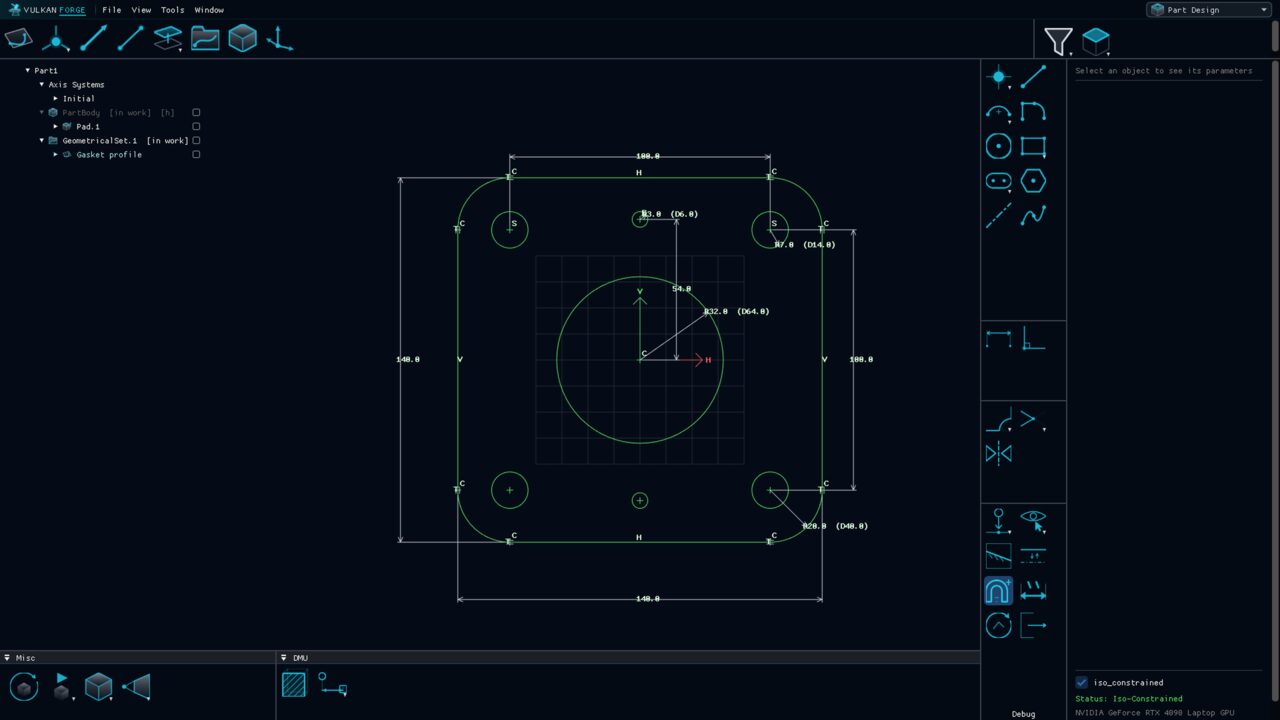
Fully constrained geometry turns green and over-constrained geometry purple, and a free-radius arc or a sliding endpoint still reads as free.

Sketcher
The 2D environment where profiles are drawn and solved. Geometry is exact lines, circular arcs and splines built from points, driven by geometric and dimensional constraints, and coloured by how constrained it is.
Why it matters
Fully constrained geometry turns green and over-constrained geometry purple, and a free-radius arc or a sliding endpoint still reads as free.
Relations inferred while drawing — coincidence, tangency, parallel, perpendicular, concentric and more — are screened as a batch, so implied or redundant ones are dropped before they are created.
Dragging a dimension stops at the feasible limit and names the constraint that blocks it; a typed value past the limit is rejected rather than leaving the sketch inconsistent.
Any dimensional constraint can be switched to a reference dimension that only measures, drawn in parentheses and never flagged as redundant.
A value-entry bar takes typed coordinates, lengths, angles and radii for the armed tool; with Dimensional Constraints on, typed values become driving dimensions.
Operations
The complete inventory, toolbox by toolbox, with the icons exactly as they appear in the application.
 Point
Point Intersection PointAssociative point at the exact crossing of two lines, circles or arcs
 Projection PointAssociative foot of the perpendicular from a point onto a curve
 Line
Line Arc
Arc Three Point ArcStart, end and a point the arc passes through
 Three Point Arc Starting With LimitsBoth limits first, then the bulge point
 ProfileContinuous polyline of lines and arcs
 Circle
 Rectangle
 Oriented Rectangle
 Parallelogram
 Centered Rectangle
 Centered Parallelogram
 Elongated Hole (Slot)Two parallel lines joined by two semicircular caps
 KeyholeTwo arcs joined by two tangent lines
 PolygonRegular N-sided polygon, inscribed or circumscribed
 Axis
Axis SplineCurve through clicked control points; open or closed
 Rounded CornerFillet between any line, arc or circle pair
 TrimRelimit two elements against each other
 Mirror / SymmetryAssociative mirrored copy, or move geometry to its mirror image
 ChamferReplace a two-line corner with a straight bevel
 ComplementSwap an arc for the complementary arc on the same circle
 CloseClose an arc into a full circle or an open spline into a periodic one
 MeasureCreate a dimensional constraint by picking
 ConstraintGeometric and dimensional constraints, incl. midpoint, symmetry and equal
 ProjectProject external 3D or sketch geometry onto the sketch plane, live
 IntersectSection external geometry with the sketch plane, live
 External geometry visibilityPickable / visible / hidden modes for external geometry
 Section viewClip the part at the sketch plane while editing (view only)
 Toggle Support geometrySwitch elements between construction and standard geometry
 Auto ConstraintInfer relations while drawing, with per-relation toggles and tolerances
 Dimensional ConstraintsTyped values become protected driving dimensions
 Update
 Exit Sketch